Thursday night. You finalize the schedule and send it to everyone.
Friday morning, one more job comes in. You open the sheet and drop it into a slot that looks open.
That's where it happens.
You find out on the day itself — a call from the person, already somewhere else. Then come the apologies, the rebuild, and asking someone else to cover.
Double booking isn't a focus problem. It's the kind of error that happens at specific, predictable moments. This post breaks down the three moments a conflict gets created, and how each one gets closed structurally rather than through vigilance.
🎉 Now live
Shiftaru is officially live. The free practice mode (sample data) needs no signup.
👉 https://shiftaru.com
Conflicts don't come from missing something — they come from not seeing it
Nobody double-books because they skipped the check.
If anything it's the opposite. The check happened — but the sheet being checked doesn't show conflicts.
You fill afternoon jobs while looking at the morning sheet. You build this week in a different tab than last week's finalized one. Each location has its own file. In every one of those cases, one person's day is scattered across several places, and no single view holds that person's whole day.
Conflicts are born in the gaps between sheets.
Which means the fix isn't "be more careful." The only thing that works is not leaving gaps.
The three moments a conflict is created
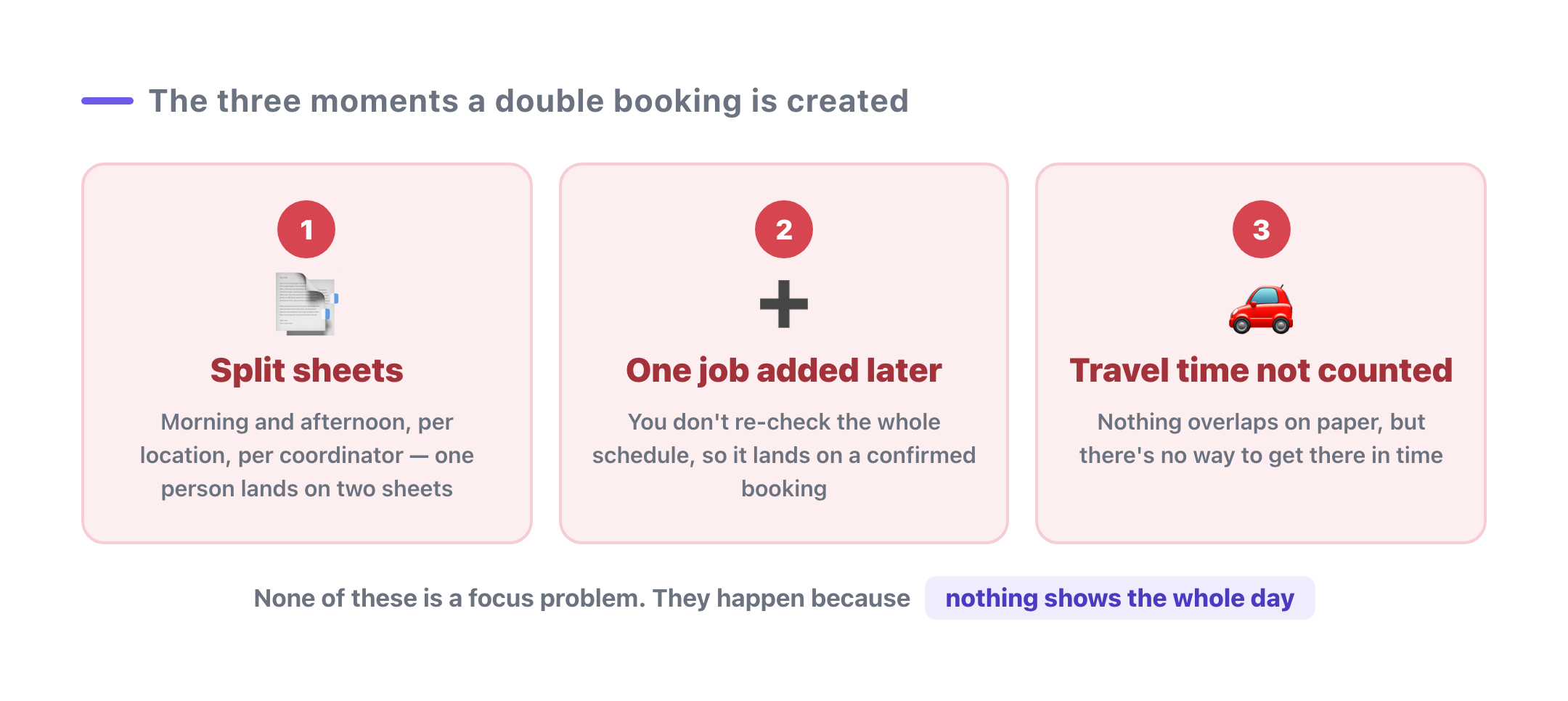
1. When the schedule is split across sheets
Morning and afternoon. Location A and location B. A tab per coordinator. The moment the schedule splits, the same person appears on two sheets independently — and filling one without the other collides by default. Every split you make is another cross-check you owe.
2. When you add one job after the fact
This is the most common one by far.
The schedule is done, and a single new job comes in. It's not worth rebuilding the week for one booking, so you eyeball the gaps — but the already-confirmed bookings have slipped out of your head, and the job lands on top of one.
That Friday morning at the top of this post is exactly this one.
3. When the time is open but you can't get there
10:00–11:00 and 11:00–12:00. On paper they line up perfectly. Nothing overlaps.
But if those are two different addresses.
There's no time to travel between them. For mobile services, in-home visits, and multi-location businesses, a schedule can be technically valid and still impossible to run. And because it isn't a visible overlap, nobody catches it until the day itself.
All three close with the same single view
Those three look like they need three different fixes.
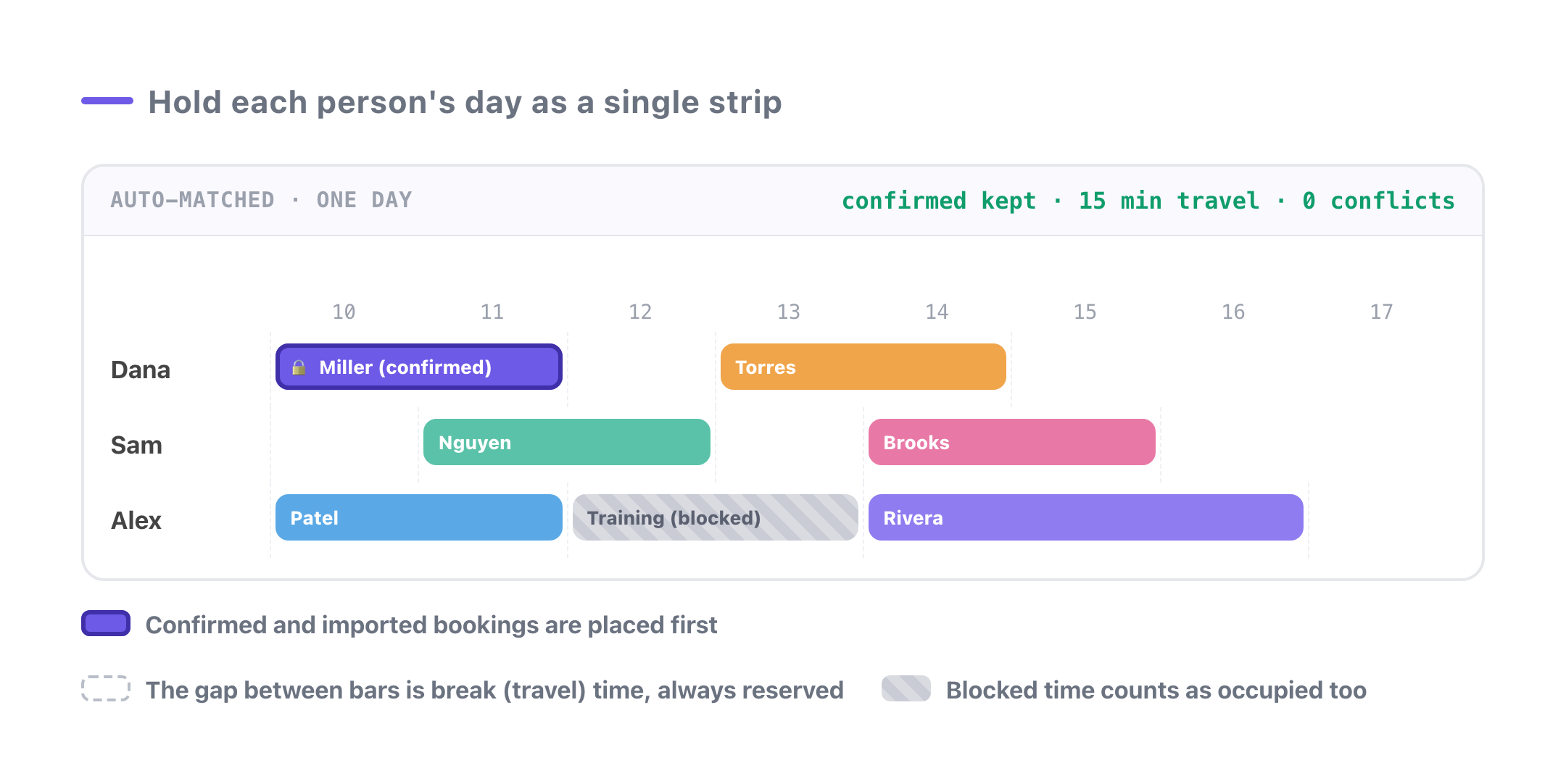
They don't. When Shiftaru builds a schedule automatically, all three close through one way of holding the data: each staff member's day is kept as a single continuous strip, and the only question ever asked is whether a job fits in it.
1. Split availability, one person-day
Even when someone submits morning and afternoon availability as separate rows, conflicts are evaluated per staff member × date, across rows. A pairing that collides on someone's day never becomes a candidate in the first place.
2. Confirmed bookings get placed first
Bookings you already finalized — or imported from a CSV — are laid onto the board as occupied time before matching starts. New bookings are then fitted around them, so a job added later can't land on an existing one. Re-running the match doesn't disturb what's already confirmed.
3. A gap is always reserved between bookings
Jobs are never packed edge to edge. A break (travel) window is reserved before a slot is considered usable. The default is 15 minutes, and you can set it to match your reality under Break time (minutes) on the scheduling screen. Blocked-out time — training, meetings, closures — is treated as occupied too (with no travel gap needed, since nobody is going anywhere).
On top of that, a staff member who already has a booking in a different area that day is dropped from the candidate pool, so a geographically impossible day never gets built.
If it doesn't fit, it doesn't go in
This is the part that makes structural prevention actually work.
You can always force a job in and make the sheet look full. But a full sheet that can't be run falls apart on the day.
Shiftaru leaves that client unassigned instead, and records why. You'll see reasons like no free time available (already booked) or conflicts with an existing booking in a different area — so the results screen tells you what blocked it, not just that it failed.
An unfilled job isn't a failure.
It's the one decision that genuinely needed a human, surfaced on its own. You adjust that one by hand or relax a condition, and leave the rest of the schedule alone.
Summary
- Double booking comes from split views, not from carelessness
- It's created at three moments: split sheets, the job added later, and travel time nobody counted
- All three close with one rule: hold each person's day as one strip, place confirmed bookings first, and reserve a gap between jobs
- If it doesn't fit, don't force it. Surfacing the one job that didn't fit is far cheaper than a collision on the day
The schedule you sent on Thursday night still holds on Friday morning.
Zero conflicts isn't something you achieve by trying harder. It's a byproduct of how the schedule gets built.
- ▶ https://shiftaru.com — free practice mode, no signup
- ▶ Read more: Shiftaru Blog