The quality of a shift schedule is mostly decided before you build it — by how you collect availability.
If requests come in accurately, on time, and in a shape you can actually work with, building the schedule gets easy. If they don't, no amount of clever scheduling will save your week.
So let's compare the four methods small businesses actually use — paper, chat apps, a shared spreadsheet, and Google Forms — on the same yardstick.
Four methods, one yardstick
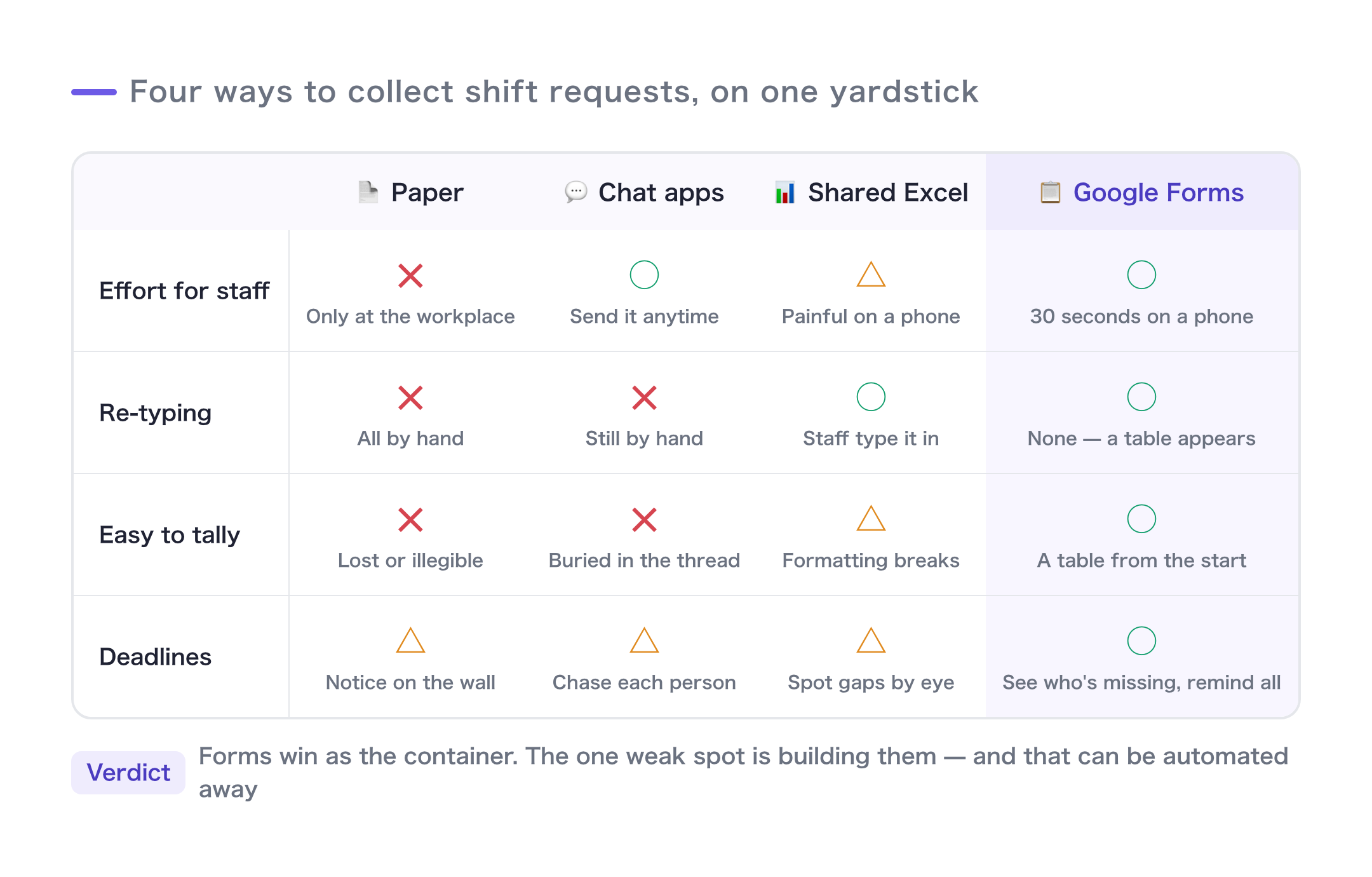
Four criteria: effort for staff / whether you have to retype anything / how easy it is to tally / deadline control.
Paper or a whiteboard
- Good: needs no explanation. Anyone can write on it on the spot.
- Painful: you have to be on site to submit. The manager retypes every single entry. Illegible handwriting, forgotten entries, lost sheets.
- Only works if everyone comes in every day.
Chat apps (SMS, WhatsApp, Slack)
- Good: everyone already has it. Messages move fast.
- Painful: availability gets buried in conversation. Every week you're scrolling back asking "wait, what did Maria say about Thursday?" And you still end up retyping it all into a spreadsheet.
- Unbeatable for communication. Just not a container for data.
A shared spreadsheet
- Good: everything in one view, and staff type it themselves — no retyping.
- Painful: the format never survives. Rows drift, people convey meaning with cell color, someone adds a column. Simultaneous edits clobber each other. It's awkward on a phone, so half the team messages you instead.
- The sting is that people enter their own data and you still have to clean it up.
Google Forms
- Good: 30 seconds on a phone. Responses land in a table automatically — no retyping, no broken formatting. Deadlines and reminders are easy.
- Painful: building the form every cycle is a chore. New period, new dates, rebuild. And if you design the questions wrong, the answers arrive in a shape you can't tally.
The verdict: Forms win. The only catch is building them
Line them up and it's not close: as a container for data, Google Forms is basically the only right answer. Staff answer on their phone, you retype nothing, and the responses are a table from the moment they arrive.
That leaves exactly one problem: the work of building — and rebuilding — the form. Laying out the dates, the time slots, the territory and service options, and then doing it all again when the period changes. I've watched plenty of managers give up right there and slide back to paper and chat threads.
So we automated the building
Shiftaru, a shift and booking auto-matching app, takes your settings — period, time slots, territories, services, certifications — and generates the Google Form with one button.
- New period? Change the dates and generate it again.
- The questions already match the app's import format, so responses can never arrive in an untallyable shape.
- Paste the response sheet's URL and the answers load straight into the app — and straight into automatic matching.
Collecting and scheduling become one continuous motion. (The form generation details are in Post 4.)
🎉 Now live
Shiftaru is officially live. The free practice mode (sample data) needs no signup.
👉 https://shiftaru.com
Summary
- Half the pain of scheduling is decided by how you collect availability
- Paper means retyping, chat threads bury it, shared spreadsheets break formatting. Google Forms is the right container.
- Forms have one weakness — building them. Automate that, and collecting flows directly into scheduling.
Look at which of the four you're on today. If the answer involves you retyping anything by hand, start with the form.
- ▶ https://shiftaru.com — free practice mode, no signup
- ▶ Read more: Shiftaru Blog