Some managers lose half a day to the schedule every week. Others are done in 15 minutes.
The difference isn't talent. It's whether the week has been turned into a routine — and whether the repetitive parts have been handed to software.
Here's the actual weekly cycle using Shiftaru, a shift and booking auto-matching app, so you can picture what your own week looks like after adopting it.
🎉 Now live
Shiftaru is officially live. The free practice mode (sample data) needs no signup.
👉 https://shiftaru.com
Where the half day actually goes
A half-day week usually breaks down like this:
- Chasing and collecting availability (scrolling chat threads, gathering paper) — 1–2 hours
- Retyping it into Excel and cleaning it up — 1 hour
- Cross-checking, building, adjusting — 2–3 hours
- Formatting and sharing — 30 minutes
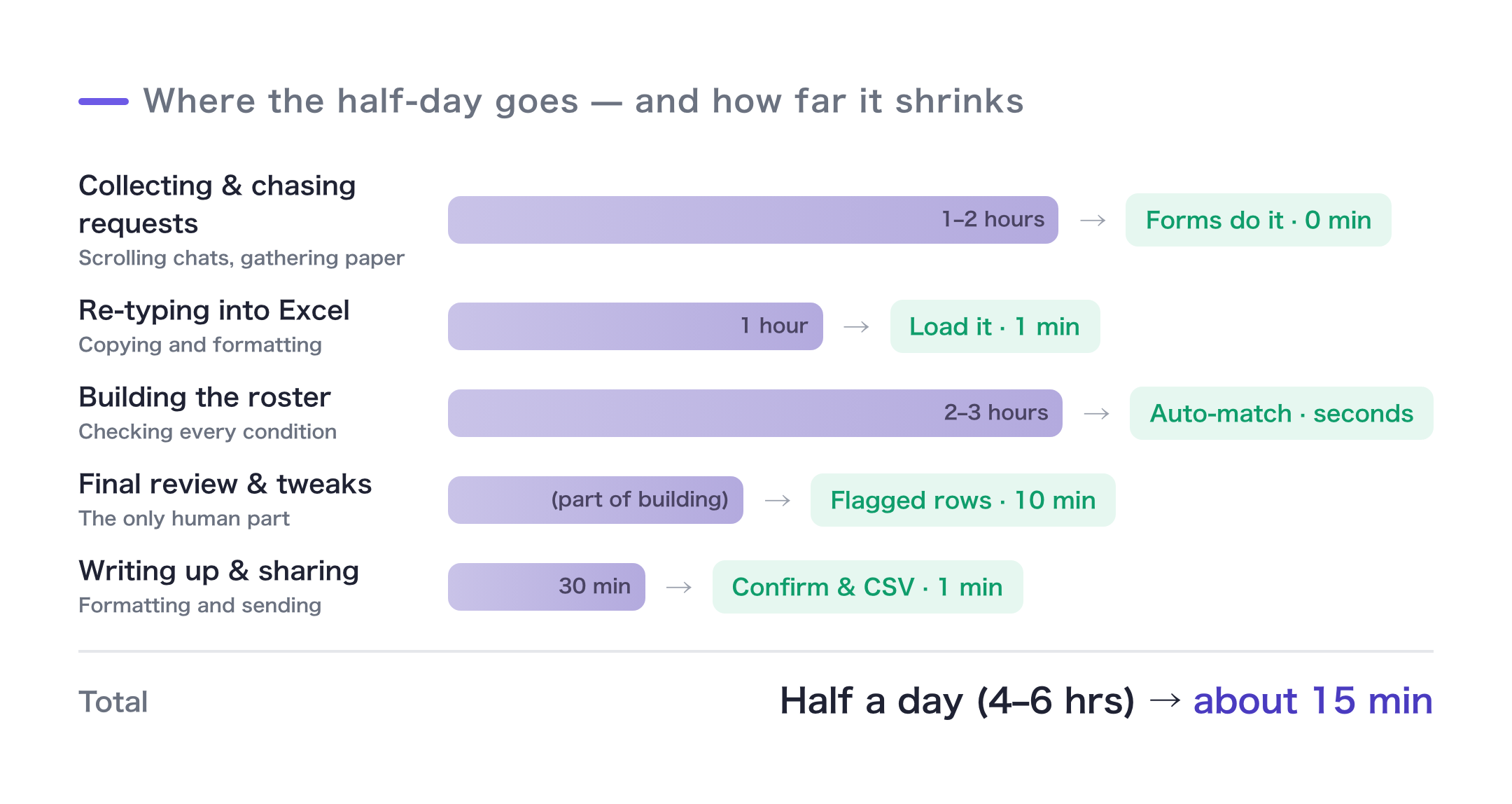
Collection, retyping, and cross-checking can all be replaced by software. What's left is the judgment only a human can make. That's the 15 minutes.
The weekly routine
Assumption: the one-time setup — territories, services, form creation — is already done (see Guide 1 and Guide 2).
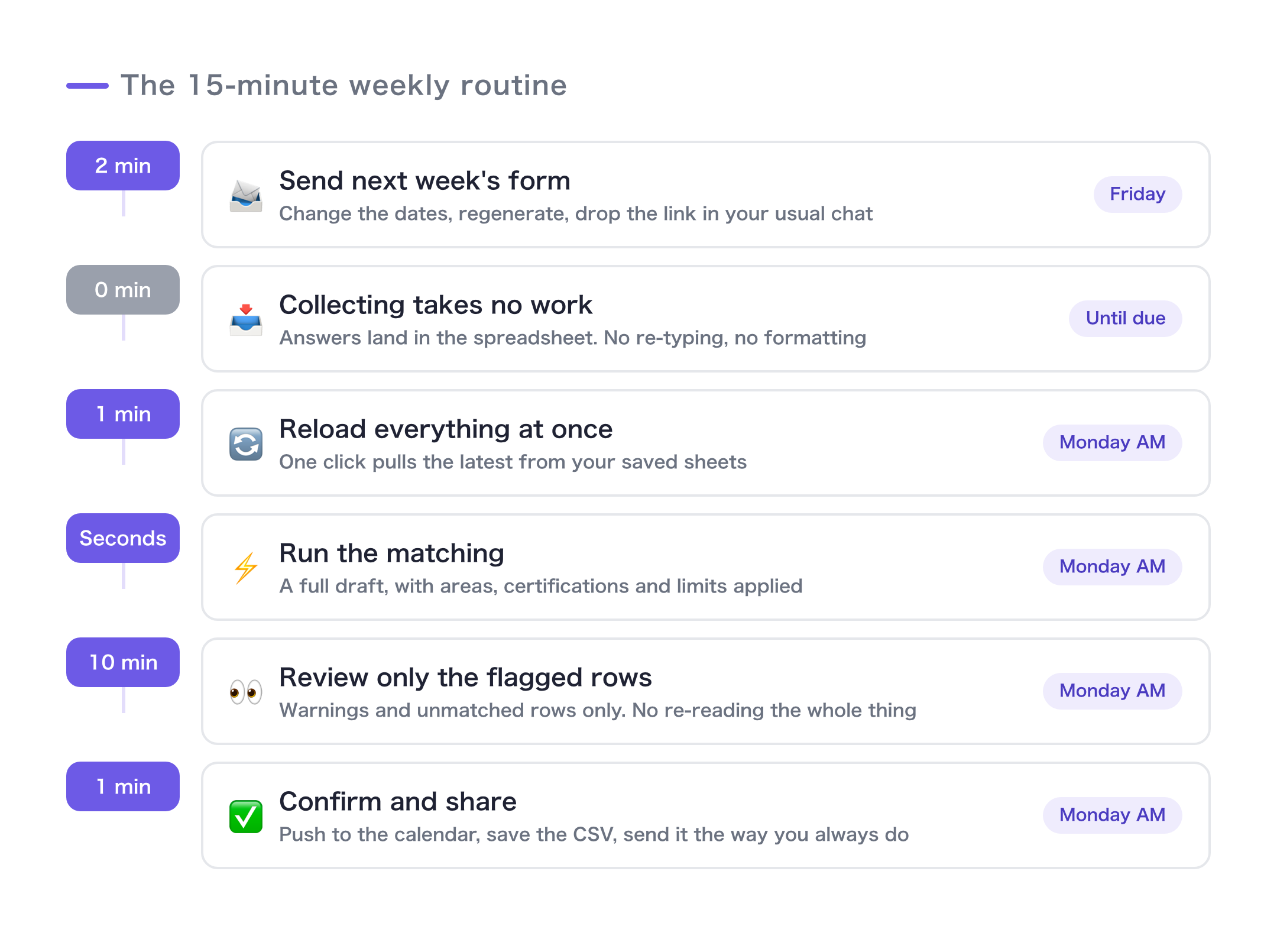
Friday: send out next week's form (2 min)
Change the target period to next week, regenerate the availability form, and post the response link in your usual team channel.
Keep a reminder message as a template and the pre-deadline nudge costs you one message.
Collection: do nothing (0 min)
Responses flow into the spreadsheet automatically. No retyping, no cleanup. (You set the sheet's publish option once, during setup — there's nothing to repeat each week.)
Monday morning, step 1: import (1 min)
Open the app and hit bulk reload from saved sheets. Customer requests and staff availability are now current.
Monday morning, step 2: run the matching (seconds)
One button. A first draft comes back in seconds, already respecting territory, certifications, time, and caps.
Monday morning, step 3: review and adjust (10 min)
This is the human part.
- Look only at rows carrying a warning icon (out of territory, time conflict, skill mismatch)
- For unmatched rows, open "see why" and assign manually from the near-miss candidates
- Swap staff from the dropdown on any row that bothers you
You're not re-scanning the whole grid — you're only looking at what the software flagged. That's why it takes 10 minutes.
Monday morning, step 4: confirm and share (1 min)
Hit confirm and it lands on the calendar. The schedule saves to your machine as a CSV, so you distribute it however you already do — print, chat, shared drive.
Keeping the routine from slipping
- Put the deadline in the form's description (e.g. "by Friday 9pm"). On slow weeks, one reminder before the deadline — that's it.
- When someone reports a change, fix it in the app right then. "I'll batch it later" is how mistakes happen.
- Clear out old bookings each week using the date-range filter + bulk delete on the bookings list. The screen stays fast.
Summary
- The half day is collection, retyping, and cross-checking. All three can be handed to software.
- What's left for you is 10 minutes of "look at what got flagged, fix it, confirm it"
- 2 minutes Friday (send) + 13 minutes Monday (import → match → adjust → confirm) = 15 minutes a week
You can run this entire loop in practice mode — free, no signup — before you commit to anything. Give it 15 minutes.
- ▶ https://shiftaru.com — free practice mode, no signup
- ▶ Read more: Shiftaru Blog